BetterKey
BetterKey app icon

Home Arrival for Homebridge

Your Apple Home knows
when the car pulls in.

Draw your Home area in BetterKey and connect it to Homebridge.
When your car arrives home, BetterKey lets Apple Home know so it can run your automations.
BetterKey and Homebridge never receive your Home address or coordinates.

Try BetterKey free for 1 week.

Download on the App Store

Requires the homebridge-betterkey plugin on your own Homebridge server.

Turn on Home Arrival

Find it in Features → Smart Home. Setup takes about a minute.

Before you begin

  • Turn on Park Location so BetterKey knows when you park.
  • Set location access to Always so Home Arrival works in the background.
  • Choose your Home area on the map. You can change it at any time.
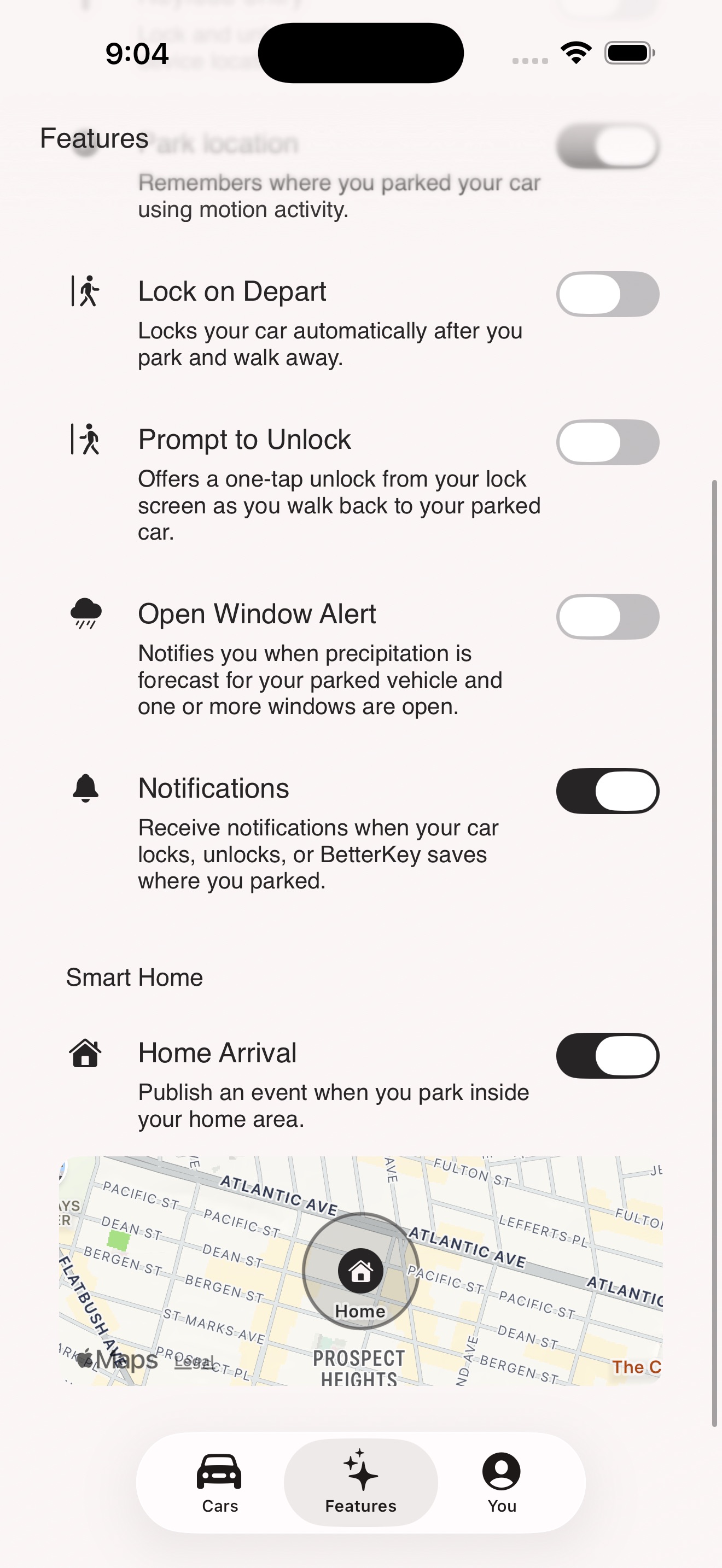
BetterKey Features showing the Home Arrival toggle in the Smart Home section, with a map preview of the Home area below it
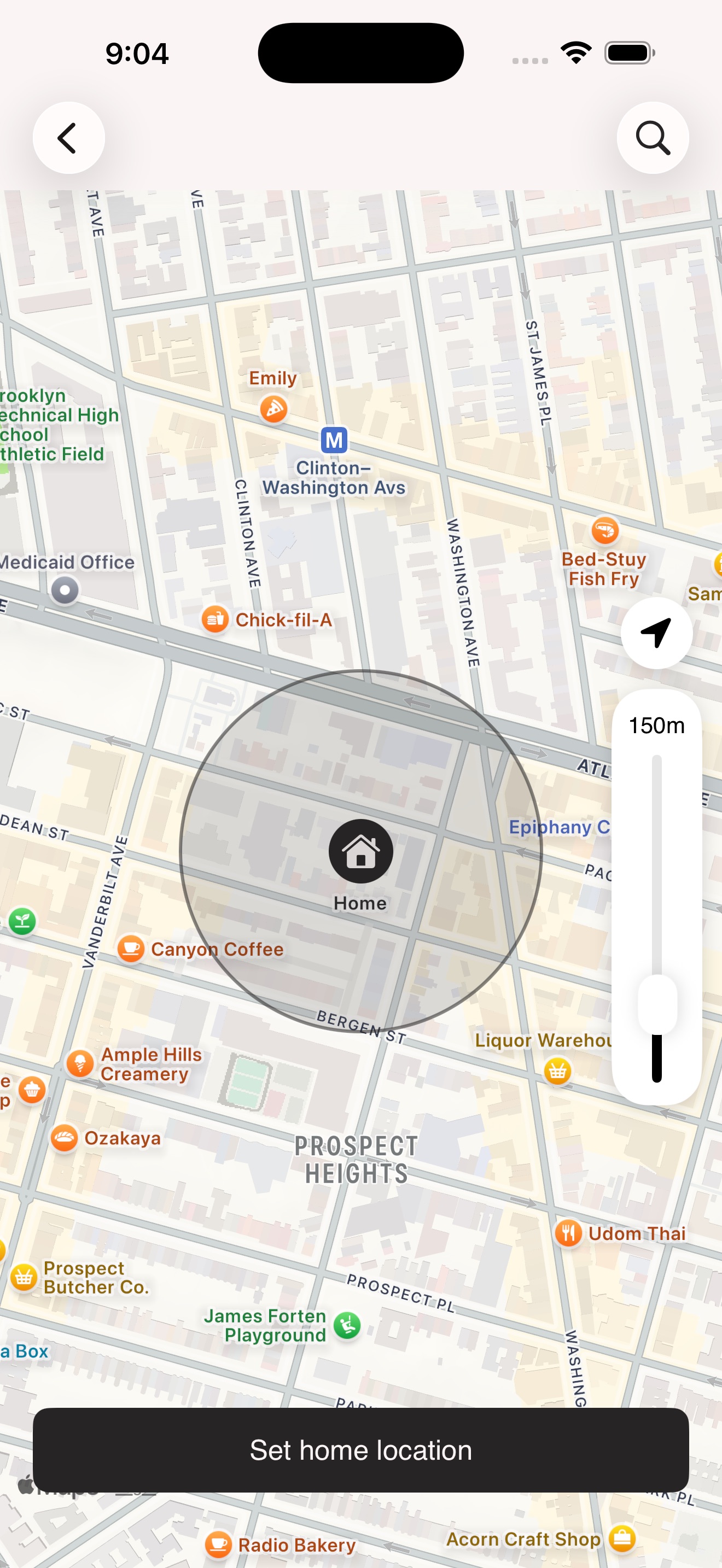
BetterKey map picker with a Home pin centered inside a 150-meter radius, and a Set home location button at the bottom

Draw the area, not the address

Drop a pin on the map and adjust the radius until the circle covers your parking spot. Whether "home" is a driveway, a curb space, or the second row of a shared lot, you decide what counts as an arrival.

What happens when you arrive

  • Park Location recognizes that your car is parked.
  • Your iPhone checks whether you parked inside your Home area.
  • If you did, BetterKey lets Apple Home know without sending your Home or parked-vehicle coordinates to BetterKey or Homebridge.

In Apple Home

Your car arrives. Your home responds.

Each vehicle appears in Apple Home as a sensor named {Vehicle} Parked at Home. When you arrive, it turns on briefly so your automation can run.

It only recognizes arrivals. It doesn’t track whether your car is home or when it leaves.

A few ideas

  • Turn on the porch light as you pull up.
  • Let someone in your household know you’re home.
  • Start a scene or another routine you already use.

Privacy

Your Home location stays out of BetterKey and Homebridge.

Your Home area and confirmed parked location are secured in your iPhone’s Keychain. BetterKey never stores them on its servers, and Homebridge never receives them.

  • Your iPhone checks whether you parked inside your Home area.
  • If you did, BetterKey shares which vehicle arrived and when.
  • No address, coordinates, or parked location are included.

Learn more about BetterKey security.

Setup

Set it up in three steps.

Home Arrival connects BetterKey to the Homebridge server you (or someone in your household) already runs. If Homebridge is new to you, installing it is the biggest step. Setting up BetterKey is quick.

In BetterKey

  • Connect a vehicle and make sure Park Location correctly saves where you parked.
  • Set iPhone location to Always so Home Arrival can work when BetterKey isn’t open.
  • Open Features → Smart Home → Home Arrival, drop a pin on the map, and adjust the radius until it covers your parking spot.

In Homebridge

  • Install homebridge-betterkey from the Homebridge UI or npm.
  • In BetterKey, open You → Tools → API Access, create a key for Homebridge, and copy it. It’s shown once, so save it somewhere safe.
  • Add the key to the plugin and restart Homebridge if it asks. Your vehicles appear in Apple Home as sensors named {Vehicle} Parked at Home.

The plugin’s README covers the full configuration reference and troubleshooting steps.

FAQs

Does BetterKey know where my home is? +

BetterKey does not receive your Home address or coordinates. The Home area you save stays securely on your iPhone and isn’t synced through iCloud by BetterKey. Your phone checks whether you parked inside it. If you use address search or the readable address shown by the picker, Apple Maps services process the search or coordinate to return those results. BetterKey shares only that your vehicle arrived home and when—never your address or parking coordinates.

See our Privacy Policy for full details.

Can Home Arrival control my car? +

No. Home Arrival can only tell Apple Home that your vehicle arrived. It can’t lock, unlock, start, stop, or locate your car, and the plugin never receives your location or other vehicle data.

You can revoke a Homebridge key at any time. To disconnect completely, revoke the key in BetterKey and uninstall the plugin from Homebridge. Learn more on our Security page or review the plugin on GitHub.

What happens if the plugin restarts, or if my phone was offline? +

Arrival notices expire after 24 hours and run only once, so a restart or brief network interruption won’t repeat an old arrival. If your phone was offline when you parked, Apple Home may not learn that you arrived.

Why didn’t Apple Home notice when I arrived? +

Home Arrival relies on Park Location to recognize that you parked. It may miss an arrival if BetterKey was force-quit, your phone couldn’t get a good location, or iOS delayed it in the background. Use it for everyday convenience, not anything safety-critical.

How is this different from an Apple Home people automation? +

Apple Home’s people automations recognize when someone’s iPhone arrives. Home Arrival recognizes a specific vehicle instead. That can be useful when a partner arrives in the car while your phone is already home, for example. The two can work together.

What happens if I revoke my Homebridge key? +

Apple Home stops receiving new arrivals until you add a new key. Revoking a key doesn’t uninstall the plugin from Homebridge; you can remove it separately if you no longer want the sensors.

Which vehicles work? +

Any vehicle you can connect in BetterKey that Park Location supports. Compatibility varies by make, model, region, and enrollment; check yours in a few seconds.

Try BetterKey free for 1 week.

Download on the App Store